Rules
The Fraud Tool has rules which let you configure actions for transactions which might be fraudulent.
Configure pre-rules for your transactions so that fraudulent transactions cannot get through. Pre-rules are examined before processing takes place.
Rule table
The rule table collects all of your transactions and displays them based on the date they were created and/or updated.
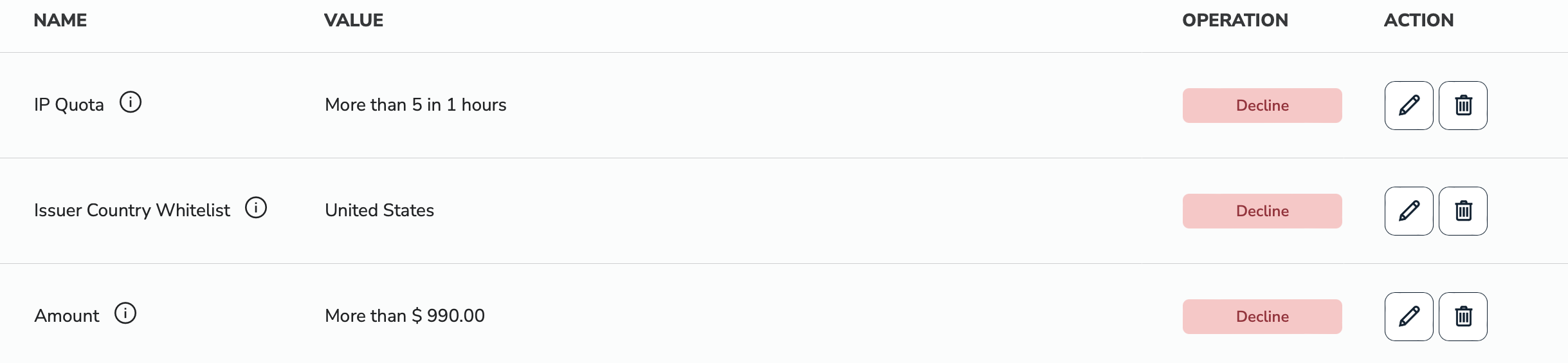
Name
Name of the Rule.
Value
Value(s) set for the given Rule.
Operation
Operation carried out for the given Rule. For now the only operation is Decline.
Action
You can easily Edit or Delete your rules.
Amount
Amount of the Transaction. Based on the configuration, if the transaction is above/below or equals the given amount, the fraud tool will decline the transaction.
-
Logic: Logic for the operation carried out. Possible values:
Less than,More thanorEquals. -
Amount: Amount of the transaction.
BIN Quota
Credit Card BIN Number Quota for Transactions. Based on the configuration, if the quota is above the given number in the given number of hours for a single Credit Card Bin Number, the fraud tool will decline the transaction.
-
Interval: Number of hours inspected by the Fraud Tool.
-
Rate: Number of transactions inspected by the Fraud Tool.
Card Brand Blacklist
If the Credit Card Brand provided with Credit Card transactions contains the blacklisted brand, the Fraud Tool will decline the transaction.
- Card Brands: Values for the Card Brand rule. Possible values:
Amex,Discover,MastercardorVisa.
Card Brand Whitelist
If the Credit Card Brand provided with Credit Card transactions contains non-whitelisted brand, the Fraud Tool will decline the transaction.
- Card Brands: Values for the Card Brand rule. Possible values:
Amex,Discover,MastercardorVisa.
Card Type Whitelist
If the Credit Card provided with Credit Card transactions contains non-whitelisted card type, the fraud tool will decline the transaction.
- Card Types: Values for the Card Types rule. Possible values:
CreditorDebit.
Email Quota
Email Quota for Transactions. Based on the configuration, if the quota is above the given number in the given number of hours for a single Email Address, the Fraud Tool will decline the transaction.
-
Interval: Number of hours inspected by the Fraud Tool.
-
Rate: Number of transactions inspected by the Fraud Tool.
IP Quota
IP Quota for Transactions. Based on the configuration, if the quota is above the given number in the given number of hours for a single IP Address, the Fraud Tool will decline the transaction.
-
Interval: Number of hours inspected by the Fraud Tool.
-
Rate: Number of transactions inspected by the Fraud Tool.
Issuer Country Blacklist
If the Credit Card provided with Credit Card transactions was issued in a blacklisted country, the Fraud Tool will decline the transaction.
- Issuer Country: Values for the Issuer Country Blacklist rule. Possible values are the currently existing countries.
Issuer Country Whitelist
If the Credit Card provided with Credit Card transactions was issued in any of the non-whitelisted countries, the Fraud Tool will decline the transaction.
- Issuer Country: Values for the Issuer Country Whitelist rule. Possible values are the currently existing countries.
State Blacklist
If the billing address provided in the transaction contains the blacklisted state, the Fraud Tool will decline the transaction.
- States: Values for the State Blacklist rule. Possible values are States of the United States.
State Whitelist
If the billing address provided in the transaction contains non-whitelisted state, the Fraud Tool will decline the transaction.
- States: Values for the State Whitelist rule. Possible values are States of the United States.